

Coming soon
FrontLink
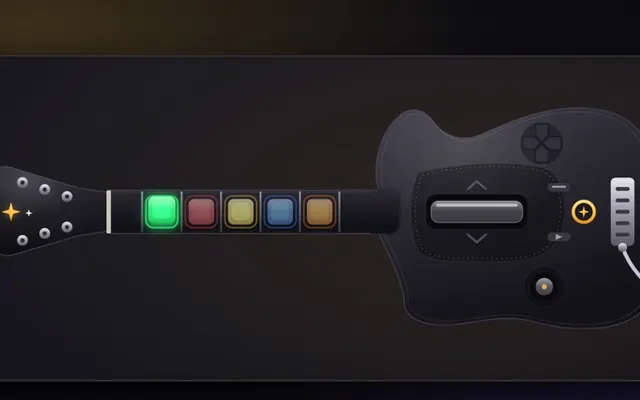
Configure. Light. Play. FrontLink is the desktop configurator for Frontier Frets guitars: map pins, calibrate the tilt and whammy, design the lights and update firmware, all from one page with a live drawing of the guitar.
What it does
Live guitar drawing
See your pin map and wiring as you set it, with conflict warnings.
Learn pins
Press a button on the guitar and FrontLink finds its pin.
Tilt and whammy
Tilt sensor found automatically; live whammy and joystick readings and calibration.
58 colour themes
Seven groups including 23 moving themes (Aurora, Rainbow Wave, Ice Flow, comets, fire). Live preview before you save to the guitar.
Wireless, profiles and live tester
Save profiles, connect wirelessly and test every button live.
Games built in
Simon Says, Whack-a-Fret and a practice trainer, running on the guitar.
Light Show Maker and firmware
Build light shows; see when a firmware update is available and update from the app.
Streamer mode
Hides private details so you can stream the configurator safely.
How it works
- Plug in the guitar
- Learn the pins
- Pick your lights
- Save to the guitar
Watch
FrontLink: set up your guitar, design its lights, map its buttons.
Screenshots
Requirements
- Linux (AppImage), Windows (portable exe or zip), or macOS (Apple silicon or Intel)
- A Frontier Frets guitar (or the simulated guitar for a look around)
- USB cable
FAQ
Do I need a guitar to try it?
A simulated guitar is built in for exploring. Real changes need a connected guitar.
How many devices?
Up to 3 devices per subscription.
Subscribe
FrontLink
Pricing will be announced at launch.
What you will get
- Live guitar drawing
- Learn pins
- Tilt and whammy
- 58 colour themes
- Updates while you subscribe
Payments are not open yet. Leave your email on this page and you will hear first.
By using this site you agree to the Terms. Everything here is the intellectual property of Frontier Frets. See the IP Notice and License Terms.